01
Drop your video
Grab an MP4, MOV, or WEBM. Nothing leaves your laptop. That unreleased clip stays yours.
YT POLICY SHIELD
MONETIZATION DIAGNOSTIC CORE // v2.0
Free YouTube Monetization Checker & AI Voice Detector
Check if your video will be monetized before you upload. Detect AI voice, robotic voice, TTS narration, reused content, inauthentic content, and YPP eligibility in your browser. No login. Video stays on your device.
DROP VIDEO INTO TARGET ZONE
or click to open the file picker
ACCEPTED: MP4 // MOV // WEBM
RESOLUTION & QUALITY
Flags anything below 720p HD as a Low Quality Error.
SHORTS / LONG FORMAT
Checks aspect ratio and length against Shorts rules.
REUSED CONTENT RISK
Looks for unedited, commentary-free stock-style footage.
AI VOICE SIGNATURE
Our tool listens to the timing and tone of your voiceover just like a human reviewer does, flagging flat and unnatural audio instantly so you can stay safe.
// HOW IT WORKS
If you make Shorts, you already know the sinking feeling of uploading a clip and waiting to see if ads even run. Drop your file here first. We check quality, reused footage, robotic TTS, and YPP-style risk in your browser so you can fix the stuff that actually gets creators dinged, before YouTube ever sees it.
Grab an MP4, MOV, or WEBM. Nothing leaves your laptop. That unreleased clip stays yours.
We look at HD quality, Shorts length, stock-style reused footage, and whether the voiceover sounds like a real person or flat TTS.
You’ll get a straight pass, warn, or fail, plus the exact tweaks (hooks, cuts, voice) that usually keep a Short in safer territory.
// WHAT WE CHECK
If your clip is softer than 720p, viewers bounce and advertisers usually stay away. We flag that early so you can re-export HD instead of finding out after upload.
Straight stock B-roll with no commentary is the classic reused-content trap. Faceless creators: add your take, cuts, and on-screen value before you hit publish.
Our tool listens to the timing and tone of your voiceover just like a human reviewer does, flagging flat and unnatural audio instantly so you can stay safe.
No account needed. The scan stays on your device. This is a creator-side estimate, not a YouTube or Google product, so treat it as a pre-flight check, not a promise.
// LOCAL ONLY
Yes. This is a 100% private in-browser local scanner. We never upload your video to any server. Your MP4, MOV, or WEBM files stay on your device, so unreleased Shorts stay yours. Drop the file, we scan it here, you keep the original.
// TTS FIX GUIDE
YouTube does not like a robotic voice. Use the English and Hindi guides below to fix TTS narration, add original value, and scan again before you upload.
// POLICY CONTRAST
This is a heuristic guide modeled on public YouTube Partner Program guidance. It is not a YouTube decision. Use it to see which patterns usually stay eligible for ads, and which often lead to limited ads or no monetization.
// LIVE DEMO
See how our diagnostic core scans real videos. The first example shows a video flagged for high reused-content risk and no clear voice. The second shows a video that failed due to low resolution.
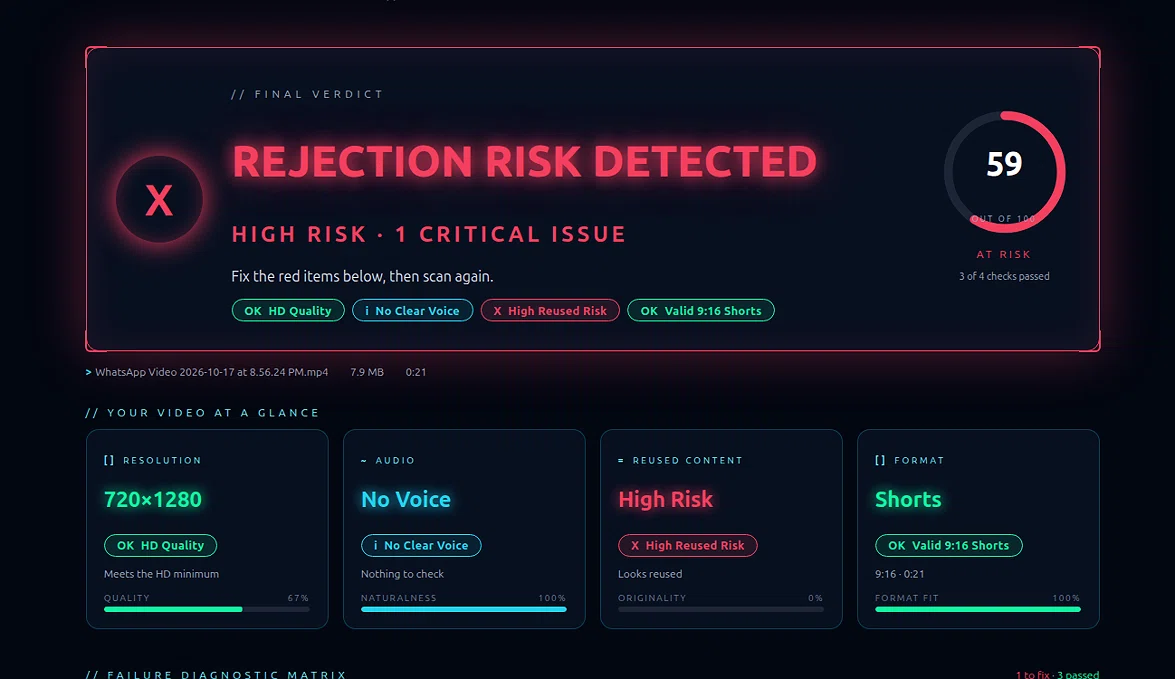
Result: 1 Critical Issue (No Voice / Reused Content).
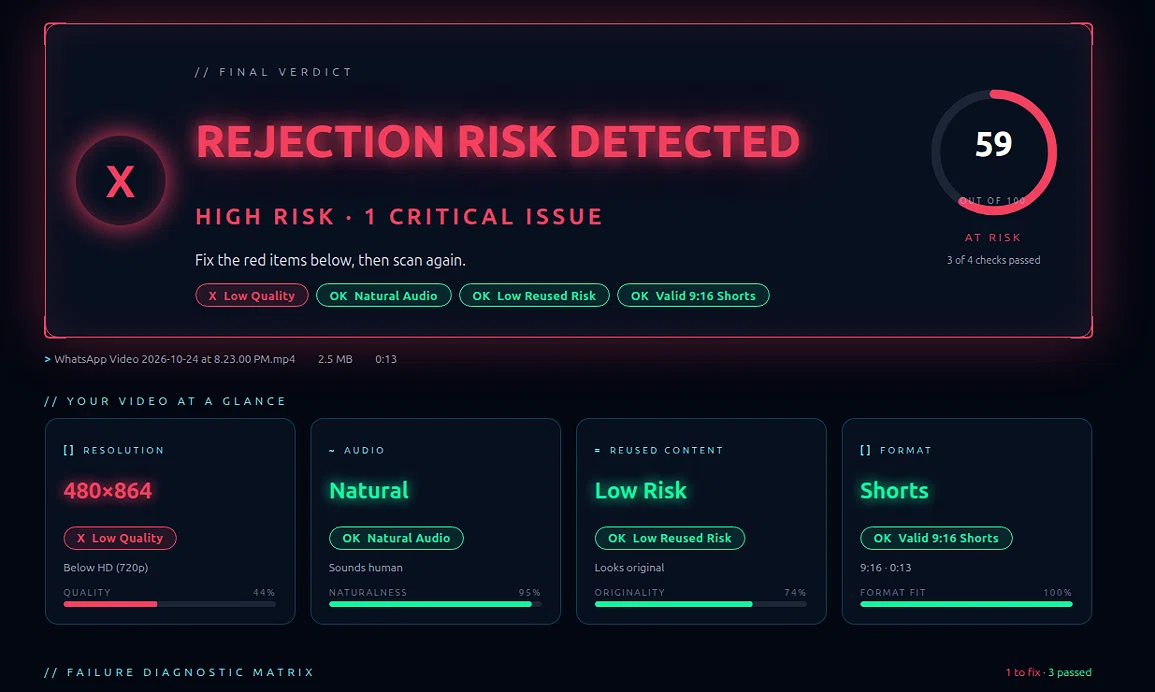
Result: 1 Critical Issue (Below 720p HD).
// YPP 2026
YPP rules still change. These 2026 points reflect publicly discussed Partner Program themes this checker is modeled on. Always confirm the latest policies in YouTube Studio. This site is not affiliated with YouTube or Google.
// FAQ
Yes. YT Policy Shield is free to use. You do not need an account to scan a video.
No. The scan runs entirely in your browser. Your video file never leaves your device, so the check is private.
No. It is a heuristic estimate based on publicly known YouTube Partner Program guidance. It is not affiliated with YouTube or Google and cannot predict their final decision.
MP4, MOV, and WEBM video files are supported, including YouTube Shorts and longer videos.
It measures pitch, loudness, and pause patterns in narration to flag a robotic voice or synthetic TTS that can hurt original-content signals.
Yes, our AI voice detector analyzes pitch and pause patterns to flag robotic TTS voices before you upload.
Reused content is footage that adds little original commentary, editing, or storytelling, such as unedited stock clips. YouTube may limit monetization on that kind of video.
This free YouTube Shorts monetization checker estimates risk from quality, reused content, AI voice, and inauthentic content before you upload. It cannot guarantee YouTube Partner Program (YPP) eligibility, but it flags common reasons Shorts get limited ads or stay unmonetized.
Yes. Scan locally with no login. The YouTube YPP eligibility checker looks at resolution, Shorts format, reused stock footage, and robotic TTS narration that often lead to limited ads or demonetization.
Yes. Faceless YouTube channel creators can run the AI voice detector and reused content checker on TTS narration and stock footage before upload, so mass-produced or inauthentic content patterns are easier to fix.
Drop an MP4, MOV, or WEBM into YT Policy Shield. The local scan flags low resolution, Shorts format issues, reused stock footage, and robotic TTS so you can fix the clip before YouTube sees it.
AI voice is not an automatic ban. A flat robotic TTS track with no original commentary is often treated as inauthentic or mass-produced content and can lead to limited ads. Add a human take, pauses, and editing, then scan again.
Common reasons are unedited reused B-roll, default TTS narration, low resolution, and videos that add little original value. This checker flags those patterns before upload. It cannot guarantee YouTube Partner Program eligibility.
// SCAN IN PROGRESS
SYSTEM LOG
// MORE QUESTIONS
It looks at pitch, pauses, and whether narration sounds flat or synthetic, so you can fix TTS before you upload.
No. Drop an MP4, MOV, or WEBM in the browser. Nothing is uploaded and you do not log in.
Yes. One local scan covers quality, stock-style footage, and narration that often leads to limited ads.
Shorts and longer videos both work. The report is an estimate, not a YouTube decision.